01
Validate the signal.
Compare the changed resource, capability, destination, integrity, performance, and load path with the reviewed browser baseline and recent releases.
INCIDENT RESPONSE AND CONTAINMENT
Turn a changed script, destination, capability, or integrity signal into a focused investigation—then choose the narrowest supported containment action and retain the context needed to recover safely.

DEFINE THE BROWSER RESPONSE LANE
Client-side incident response is the process of validating suspicious browser behavior, identifying the responsible provider or resource, scoping affected pages and observed sessions, coordinating owners, and applying reviewed containment where supported.
Compare the changed resource, capability, destination, integrity, performance, and load path with the reviewed browser baseline and recent releases.
Identify the pages, functions, geographies, devices, and captured sessions where the behavior appeared instead of assuming site-wide exposure.
Preview and test the narrowest supported destination, resource, or provider control; record ownership, expected impact, rollback, and follow-up in the organization's incident workflow.
FROM CHANGED BEHAVIOR TO SCOPED CONTAINMENT
A browser-side signal becomes actionable when the team can connect it to the exact resource, upstream provider, affected experience, observed sessions, capabilities, and destination. Use that scope to compare resource-only, destination-only, and provider-wide options before changing production behavior.
Join the changed behavior to provider, resource, dependency, capability, destination, page, and session context.
Separate where the signal was captured from pages and sessions where it was not observed; absence of evidence is not proof of absence.
Compare supported destination, resource, and provider boundaries, then test operational impact and keep rollback instructions in the organization's response workflow.
SESSION-LEVEL INVESTIGATION
Review the observed session timeline around the event: which resource loaded, what ran before it, which supported browser capabilities appeared, where requests went, and whether errors or performance changes followed. The sequence helps responders form and test a hypothesis without treating telemetry as a complete forensic reconstruction.
Place the changed behavior beside load order, dependency, request, capability, and application events observed in the same session.
Compare first seen, last seen, resource history, prior incidents, expected deployments, and service-owner information.
Give security, engineering, privacy, vendor, and business owners a shared technical record for classification and next steps.
EVENT-LEVEL BROWSER TELEMETRY
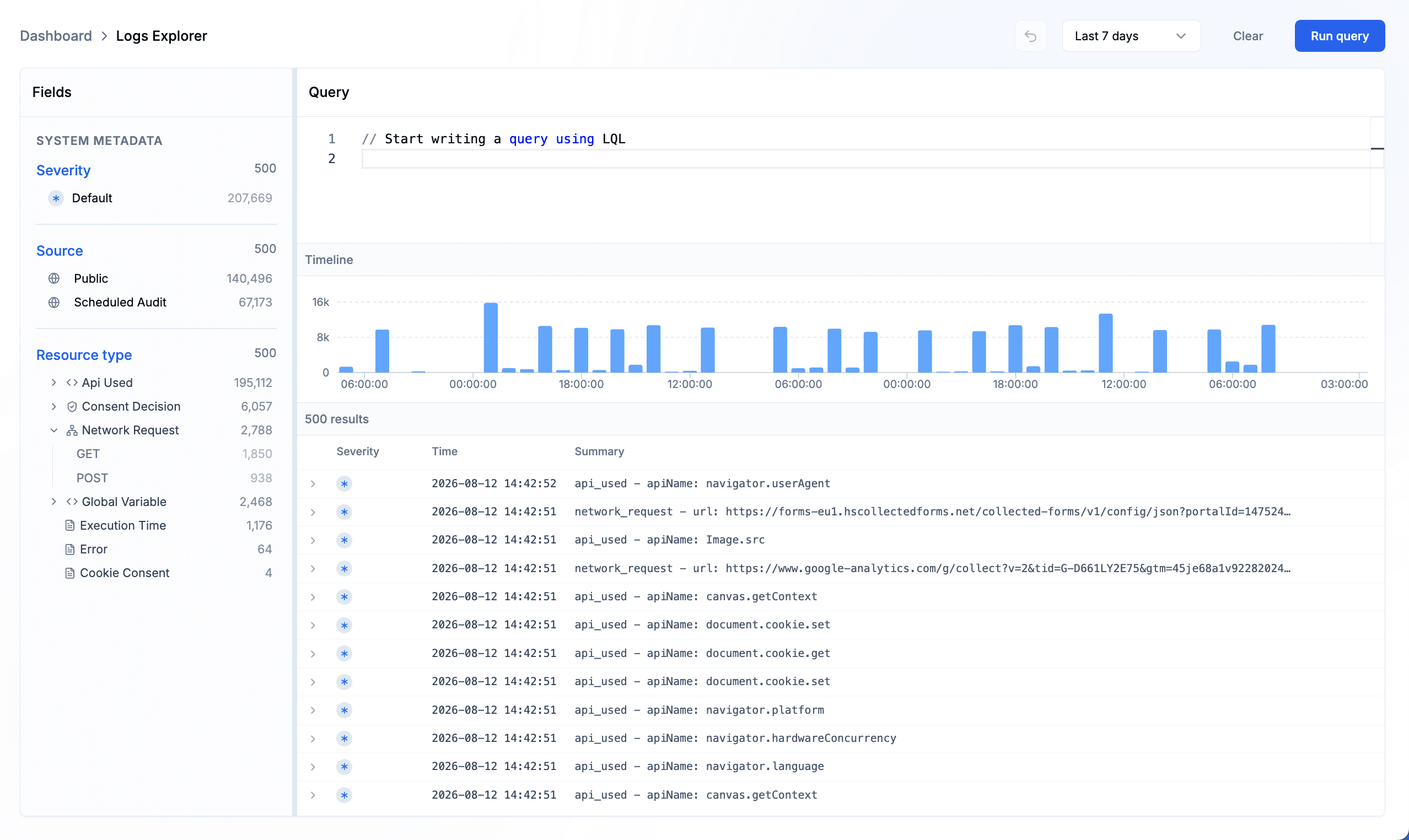
Move from the event stream into an individual telemetry record, then expand nested metadata to inspect the observed API, initiating resource, network activity, timestamp, and surrounding runtime context without leaving the result set.
Review supported API use, network requests, execution timing, errors, consent decisions, and related browser observations in one investigation view.
Open an individual result to review its timestamp, resource, session, domain, event type, and available metadata.
Expand nested fields to connect observed browser behavior with the resource that initiated it and carry that context into response work.
PRESERVE THE RESPONSE RECORD
Containment can change the evidence it was meant to address. Keep the original browser observation, observed scope, supporting session context, selected control, timestamp, and latest disposition available, then record ownership, approval, expected impact, rollback, and validation in the organization's incident workflow.
Keep the original observation and current containment state available, and record formal validation results in the organization's incident workflow.
Record who approved the action, why that scope was chosen, which service owner participated, and when reassessment is due.
Use the current control and browser observations alongside the rollback path and post-restoration checks maintained in the organization's response workflow.
A BROWSER-SIDE RESPONSE RUNBOOK
The browser response lane should accelerate the wider incident process while keeping classification, risk acceptance, communications, legal decisions, and recovery with their accountable owners.
Confirm the signal, resource, provider, page context, baseline difference, release timing, business purpose, and corroborating evidence before escalating.
Identify observed pages, sessions, destinations, dependencies, errors, performance effects, geographies, and functions; document coverage gaps explicitly.
Preview supported controls, coordinate the service owner, verify recovery and bypass paths, apply the approved scope, and watch for security and functional effects.
Confirm the signal has changed as expected, preserve evidence, restore deliberately when appropriate, document the outcome, and update baselines, policies, and runbooks.
ONE INCIDENT, DISTINCT RESPONSIBILITIES
A shared record reduces translation between teams while preserving the authority each function needs to classify, contain, communicate, and recover.
Correlate the signal, determine severity with wider evidence, coordinate containment, and maintain the incident timeline and escalation path.
Validate code and release context, estimate functional impact, test the selected boundary, maintain rollback, and verify restoration.
Confirm vendor purpose and change, assess data and customer implications, support communications, and approve risk and availability decisions where assigned.
Go deeper into the controls, evidence, and related use cases behind this workflow.
Inspect captured resource behavior and session context behind a signal.
Review resource, provider, capability, and network controls for supported browser activity.
Follow direct and indirect dependencies when a provider or resource changes.
See how browser discovery, investigation, policy control, and supporting evidence work together.
CLIENT-SIDE INCIDENT-RESPONSE FAQ
Understand what browser evidence contributes, how scoped controls should be used, and which responsibilities stay with the wider incident program.
It is the investigation and treatment of suspicious behavior in website visitors' browsers, including changed scripts, dependencies, capabilities, destinations, integrity, errors, or performance.
Browser-side support:Browser telemetry can connect the signal to the responsible resource, affected context, available controls, and response record.
No. An anomaly can result from a legitimate release, experiment, configuration change, browser difference, service update, operational failure, or malicious activity.
Browser-side support:Correlate baseline, ownership, release, session, provider, threat, and application evidence before classifying the event.
Review the pages, functions, captured sessions, devices, geographies, providers, resources, dependencies, capabilities, requests, errors, and performance effects associated with the signal.
Browser-side support:Describe this as observed scope and record coverage gaps; unobserved activity may still exist.
Configured policies can restrict supported destinations or pause supported resources and providers processed through enforcement mode.
Browser-side support:Choose the narrowest justified scope, test application impact, obtain the required approval, and retain rollback and bypass procedures.
Useful platform context includes the original signal, resource and provider identity, load flow, capabilities, destinations, affected sessions, current policy state, latest disposition, and timestamps.
Browser-side support:Use this alongside—not instead of—the ownership, approvals, rollback, validation, tickets, logs, forensic artifacts, communications, and evidence maintained through the incident plan.
Restoration depends on verified remediation, business impact, testing, owner confirmation, monitoring readiness, risk acceptance, and the organization's recovery authority.
Browser-side support:Restore deliberately, validate the expected browser behavior, and preserve the decision and updated baseline.
Alerts and findings can be routed into supported collaboration, ticketing, observability, or security integrations, depending on configuration.
Browser-side support:Keep the organization's established system of record and escalation process; use browser context to enrich it.
No. Those systems aggregate, orchestrate, protect other layers, express policy, or support formal evidence acquisition. Browser monitoring addresses a narrower runtime view.
Browser-side support:Combine browser evidence with server, endpoint, identity, network, cloud, source, vendor, and threat intelligence.
Bring browser-side signals, affected scope, reviewed controls, ownership, and recovery evidence into the incident process your team already trusts.